
China · Guangzhou examples
How to use shared bikes in Chinese cities
Choose a bike service, prepare your account and take a first ride. English app options, parking and ending the rental, with Guangzhou examples.
A bicycle can be a useful answer to an awkward city journey: the Metro gets you close, but the last stretch is too far to walk comfortably and too short to justify waiting for a car. Shared bikes let you cover that stretch without buying a bicycle or finding somewhere to keep it overnight.
Foreign visitors can use services that accept their documents and payment method. The first rental takes more preparation than the next: you may need to register with the operator, confirm your identity and arrange payment before a lock will open. Make that first attempt when you have time, rather than when you are already late.
These are ordinary pedal bicycles. Shared electric bikes and privately owned e-bikes involve different services and conditions; for buying your own vehicle, see our e-bike guide.
Start with the bike's brand
The bicycles parked together outside a station may belong to different companies. In central Guangzhou, the transport authority's current allocation notice names Hello / 哈啰, Meituan / 美团 and Qingju / 青桔. Qingju is DiDi's bicycle brand; the other two are separate businesses.
Choose by the operator's name and logo, not just the colour. Your phone needs to open the service for the particular bicycle in front of you.
If an app offers English, choose it before setting up your first ride. You do not need to find a separate English-branded app: a language option inside the correct mainland-China service may be the route you need.
| Operator | Language information | How to approach it |
|---|---|---|
| Qingju / 青桔 | DiDi's mainland iOS listing includes English, and DiDi has published an English Bike and passport-registration route. | Start with DiDi's English mode and look for Bike or Qingju where the service is available. |
| Meituan / 美团 | Meituan's mainland iOS listing includes English. This describes the app's listed languages rather than every bicycle screen. | Use English where your version offers it; use the English explanations below for any Chinese bicycle screens. |
| Hello / 哈啰 | Hello's mainland iOS listing currently specifies Simplified Chinese. | Use the official Hello app or its supported Alipay entry, with the English instructions in this guide. |
These language declarations are from the mainland iOS listings checked on October 15, 2026. Android versions, regional app-store listings and individual bike-service pages may differ. An English main menu is not a promise that every verification or return screen is translated.
For an English option, try DiDi's English mode for Qingju. Its published bike announcement specifically describes passport registration. Meituan is another app listing English; check the language options on your installed version. Registration, payment and the bicycles available near you still help determine which service to use.
If you already use Alipay and want Hello, search for 哈啰, or scan a clearly marked Hello bicycle and check the service that opens. The Transport or Bike entry is another route if it appears on your version. English in Alipay does not necessarily translate every page inside the bicycle service, so keep the short Chinese terms below handy.
You can still use this guide when an operator's screens are in Chinese. Read the English explanation of the task, identify the corresponding label and check the result before continuing. There is no need to install all three apps for one short trip.
A Japanese visitor’s account from Guangzhou describes renting a Hello bicycle through Alipay with an overseas setup. It is a useful example of a workable entry point, not a guarantee that every nationality, card or account will pass the same checks. Let your own service’s verification and payment result decide.
Get the account ready before looking for a ride
Keep your passport details, a phone number that can receive verification messages and a payment method available. Use your own account and the identity details requested by the service. The bicycle operator may ask for additional information even after you have verified your payment wallet.
Look for a document choice such as Passport / 护照 or an entry for overseas users. If a screen accepts only a Chinese resident identity card, look for another supported verification route or ask the operator's help service where passport users should apply. Do not enter a made-up identity number. For a foreign phone number, check whether a country-code selector or another sign-in option is available.
Set English where the service offers it. A mini-program opened inside an English Alipay or WeChat account can still contain Chinese screens. Use the translation tools available on your device, or ask someone to help you understand the price, identity request and return instructions before you unlock. Do not approve a payment simply because it is the most prominent button.
Some useful labels are 手机号 (mobile number), 实名认证 (identity verification), 单车 / 骑行 (bicycle / cycling), 扫码 (scan), 还车 (return the bicycle) and 客服 (customer support). Their position may change between versions; the task they describe is the useful part to recognise.
If payment is your main obstacle, prepare your wallet first. A linked card may work for shopping while a particular bicycle payment is declined. Check the methods offered in that bicycle service rather than repeatedly adding the same card.
Take a short first ride
Choose an easy journey with a suitable place to return the bike. Before unlocking, open the operator's map and look near your destination for parking instructions. A bicycle standing beside other bicycles is not necessarily in a valid return area.
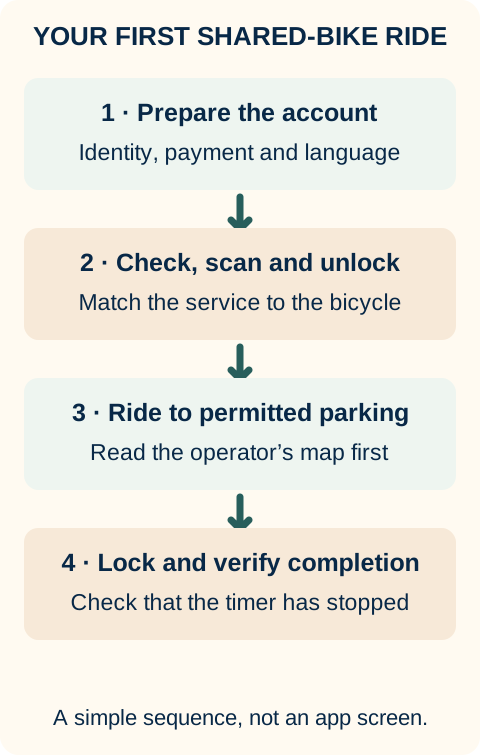
Then work through the rental in this order:
- Inspect the bicycle. Check the tyres, brakes, saddle and obvious damage. Choose another bike if something looks wrong.
- Scan its QR code. Use the operator's app or a supported wallet entry. Confirm that the service and bicycle identifier match what is in front of you.
- Read the price. Check the starting charge, how additional time is counted and any parking or management charge. Choose a single ride rather than a pass until you know the service works for you.
- Complete the prompts. The service may request location, camera or Bluetooth access for finding and unlocking the bike. Read what each request is for.
- Confirm the unlock. Follow the instructions for that bicycle and check that the lock has opened. Look at the app's order status if it does not open.
- Ride to the permitted return area. Follow local signs and the operator's riding restrictions. Stop somewhere safe before using your phone.
- End the rental and check the result. Follow the displayed locking or return action, then confirm that the ride is marked complete and the timer has stopped.
The last step matters. Different bike models use different locks and return controls, so copying another rider's hand movement is less useful than reading your own service's instructions.
Use cycle lanes where provided, obey the signals and get off before checking your phone. Do not use your account to unlock a bike for someone who does not meet the operator’s age or identity conditions.
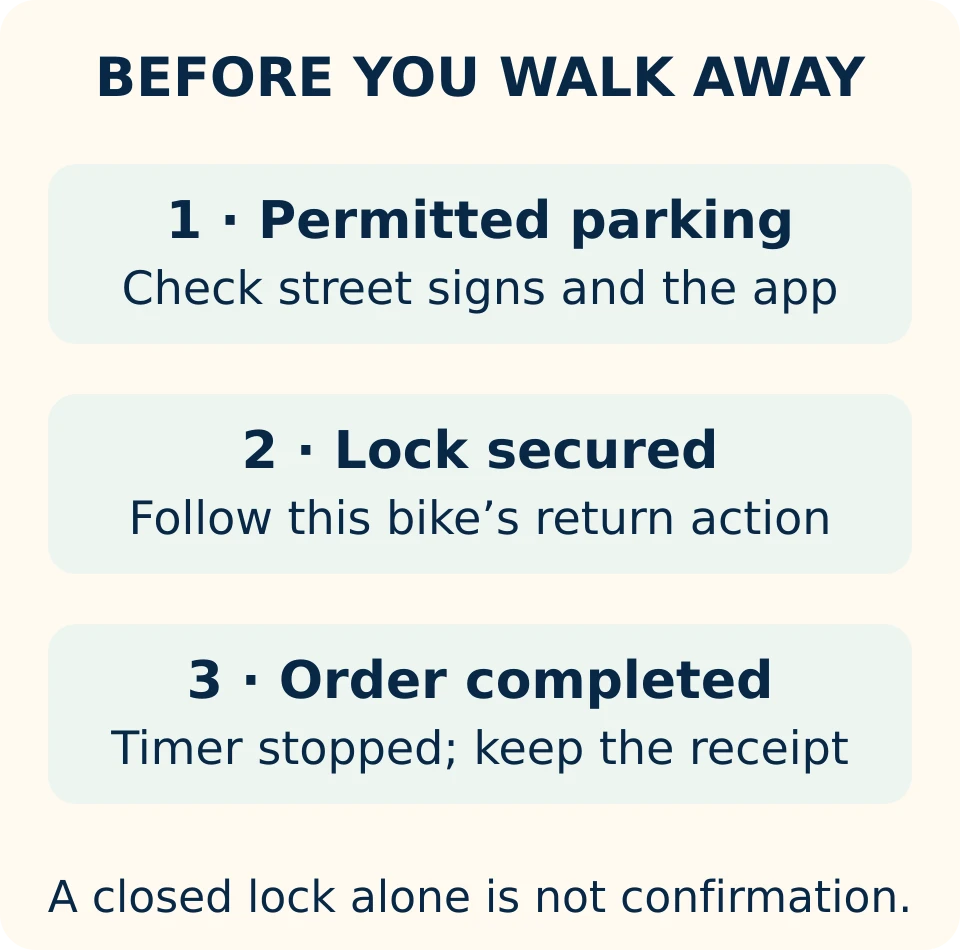
Return it where both the street and the app allow
In Guangzhou, some areas require bicycles to be parked in designated spaces. Keep entrances, tactile paving and pedestrian routes clear. The operator's map also tells you about its service boundary and places where returns are restricted.
A service area is the part of the city where that operator allows its bicycles to be used or returned under its rules. A parking point is a place identified for leaving the bicycle. The map may use shaded areas, pins or warning messages to explain the difference. Read the labels rather than assuming a particular colour always means the same thing.
If the app says your position is outside the return area, check the location marker and move to the indicated permitted place before ending the ride, where it is safe to do so. Some services apply an additional management charge for an out-of-area or prohibited return. The amount belongs to the service and city shown on your screen; there is no single price that applies across China.
After locking, stay long enough to see a completed order. Save its details if the charge or return status looks wrong. When the first rental ends normally, you will know which account, payment method and return process work for you.
When the bike or account will not cooperate
The bike will not unlock. Check whether an order has started. If it has not, read any account or payment message, report a damaged bicycle through the service and try another suitable bike. If an order is already active, resolve that order before starting a replacement rental.
The app still shows an active ride. Reopen the same operator or mini-program you used to start it. Check the lock and any parking warning, follow its return instructions, and use the active order's Help or Report option if it still will not finish. Keep the bicycle ID, location, time and a photograph of where you parked.
Your passport or payment is rejected. Use the operator's official help channel or try another operator that offers a suitable route. For a journey you need to make immediately, take the Metro, a taxi or a car-booking service, then sort out the bicycle account when you have time.
Once you have a working service, shared bikes can become a straightforward part of a city visit. Start with a short journey, learn where that operator lets you park, and make checking the completed order part of every return.
Useful Chinese
Show this to staff, or play it if your device has a Chinese voice.
How do I verify my identity with a foreign passport?
Can I return the bicycle here?
The bicycle lock will not open.
I have locked the bicycle, but the ride is still being billed.
Sources & verification
Last checked by Happier China: Oct 15, 2026
The dates below belong to the source publishers. Check the responsible service’s current instructions when making a booking or application.
- Guangzhou shared-bike operators and allocation
Guangzhou Transport Bureau
Published: Aug 6, 2026 - Guangzhou shared-bicycle management framework
Guangzhou Municipal Government
Published: Sep 21, 2020Effective: Nov 1, 2020 - DiDi mainland iOS listing
DiDi / Apple App Store
Source date: Language information - Meituan mainland iOS listing
Meituan / Apple App Store
Source date: Language information - Hello mainland iOS listing
Hello / Apple App Store
Source date: Language information - DiDi: English bike service and passport registration
DiDi
Source date: Publication date not suppliedSource note: reviewed Oct 15, 2026 - Using shared bicycles through Alipay
Beijing Municipal Government
Published: Aug 30, 2024 - A Japanese visitor’s shared-bicycle ride in Guangzhou
4G China / よんじーの中国ライフ
Published: Jul 25, 2026Source note: reviewed Oct 15, 2026
Comments & practical questions
Keep comments practical and relevant. Off-topic political or religious arguments, explicit content, hate, spam or illegal content may be removed. Comments are reviewed before publication. Comment rules.
Loading comments…